Google Feed Attributes That Move Shopping Performance (and the ones that don’t)
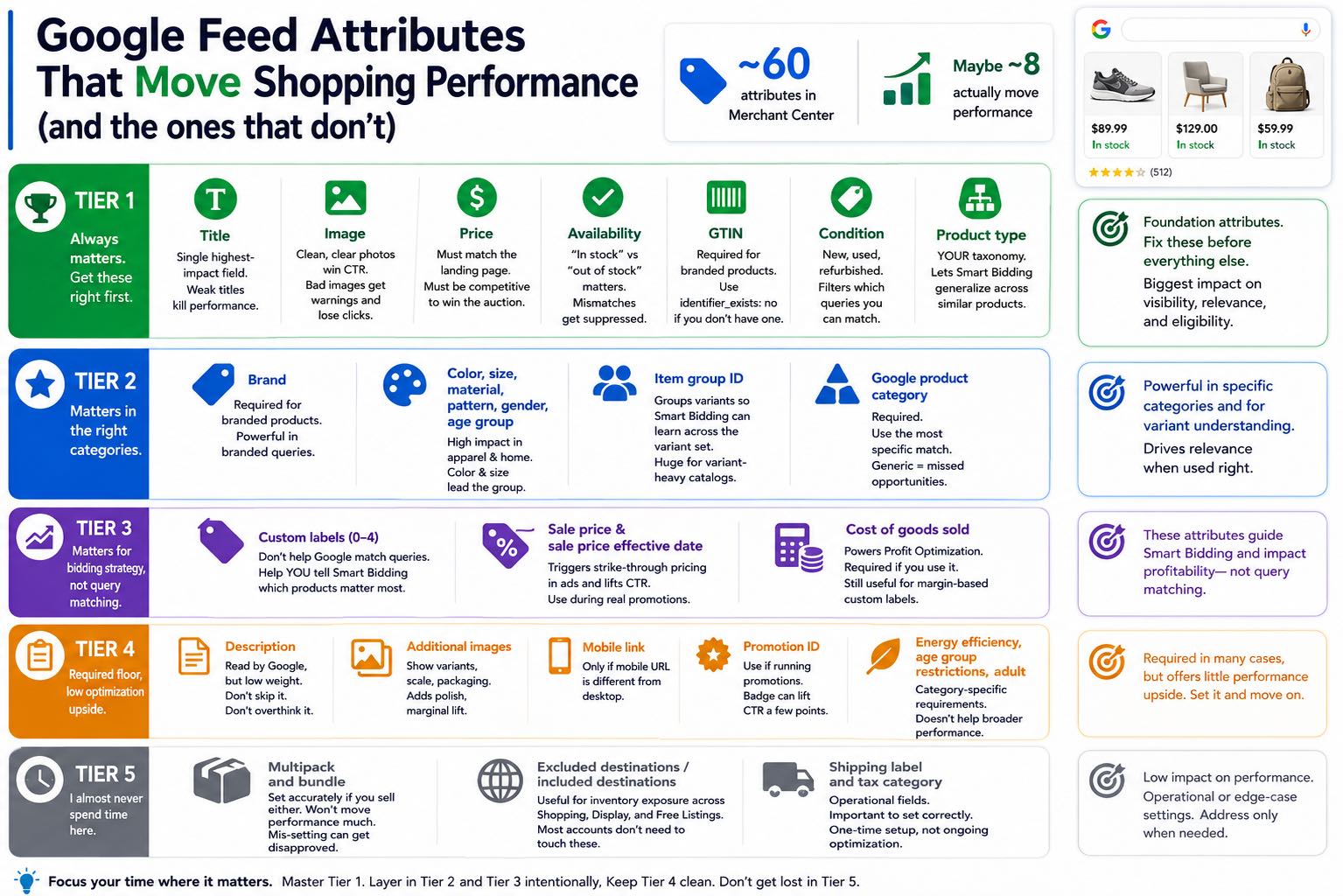
Google Merchant Center has roughly 60 google feed attributes you can populate. Maybe 8 of them actually move performance.
The rest are either required to keep your products approved, cosmetic, or only matter in specific categories. Confusing those buckets is how feed work eats weeks and delivers nothing.
I’m Kevin Wetherby. I spent 19 years in paid search, including time at Google. I wrote a book on data feed optimization. I’ve populated and rewritten more attributes than I care to count, on accounts ranging from 50 SKUs to 500,000. Here’s how I think about which ones to spend time on.
The tier list
I rank attributes into four tiers based on what I’ve actually seen move ROAS. Your category may shift things slightly, but the order is stable across most accounts I work on.
Tier 1: Always matters. Get these right first.
Title. Single highest-impact field. I covered titles in their own article. If your titles are weak, no amount of work on other attributes will save you.
Image. Google rewards clean product photos on white or contextual backgrounds. Lifestyle shots can win in apparel and home. Cluttered, watermarked, or text-overlay images get policy warnings and lose CTR. If your hero SKU has a bad image, fix that before you touch anything else.
Price. Has to match the landing page. Has to be competitive enough to clear the auction. Price competitiveness is its own topic and I’ve written about it elsewhere.
Availability. “In stock” vs “out of stock” matters obviously. The bigger trap is products that say in stock in the feed but are actually out of stock on the landing page. That gets you a price/availability mismatch warning, which suppresses the product.
GTIN. For branded products with manufacturer codes, GTIN (typically known as the UPC) is required and improves relevance. If you sell custom or private label, you don’t have one and that’s fine. Use identifier_exists: no and move on.
Condition. New, used, refurbished. Required field, but importantly it filters which queries you match. “Refurbished iPhone” is a separate query universe from “iPhone”.
Product type. This is YOUR taxonomy, not Google’s. It’s how I segment everything in the audit step. A good product type hierarchy lets Smart Bidding generalize across similar products. A bad one (or a missing one) wastes a powerful signal. While this attribute is not visible, potential customers’ search queries can be tied to this information.
Tier 2: Matters in the right categories.
Brand. Required for branded products. Powerful for relevance in branded queries. Useless if you’re private label.
Color, size, material, pattern, gender, age group. These move performance in apparel and home goods. Color and size are the highest-impact of the group. Including them in the dedicated fields AND in the title is the move.
Item group ID. Lets Google understand product variants. If you have 12 colors of the same shirt, item group ID groups them so Smart Bidding can learn across the variant set. Skipping this on a variant-heavy catalog is leaving real money on the table.
Google product category. Required, but easy. Get the most specific match available. Generic categories miss filtering opportunities. Use Google’s taxonomy file, don’t guess.
Tier 3: Matters for bidding strategy, not query matching.
Custom labels (0 through 4). The single most underused attributes in Merchant Center. They don’t help Google match queries. They help YOU tell Smart Bidding which products matter. I’ve covered these in depth in their own article in this cluster.
Sale price and sale price effective date. Trigger the strike-through pricing in the ad, which lifts CTR. Worth using during promotional periods. Don’t use them as a hack to make every product look discounted, the system catches on and the lift goes away.
Cost of goods sold. Powers Profit Optimization for Shopping. If you’re running Profit Optimization, this is required. If you’re not, populating it is still useful for margin-based custom labels.
Tier 4: Required floor, low optimization upside.
Description. Google reads it, but weights it far below title. Don’t skip it, don’t obsess over it. Write a clear paragraph that covers what the title couldn’t.
Additional images. Show variants, scale, packaging. Adds polish, marginal performance lift.
Mobile link. Only matters if your mobile URL is different from desktop. Most modern sites don’t need it.
Promotion ID. Worth using if you’re running merchant promotions. The badge can lift CTR a few points. If you don’t run promotions, ignore it.
Energy efficiency, age group restrictions, adult. Category-specific. Required for those categories. Doesn’t help broader performance.
Tier 5: I almost never spend time here.
Multipack and bundle. Worth setting accurately if you sell either. Won’t move performance much, but mis-setting can get a product disapproved.
Excluded destinations / included destinations. Useful if you’re managing inventory exposure across Shopping, Display, and Free Listings. Most accounts don’t need to touch these.
Shipping label and tax category. Operational fields. Important to set correctly because they affect your shipping/tax calculations, but they’re a one-time setup, not an ongoing optimization.
What I do in practice
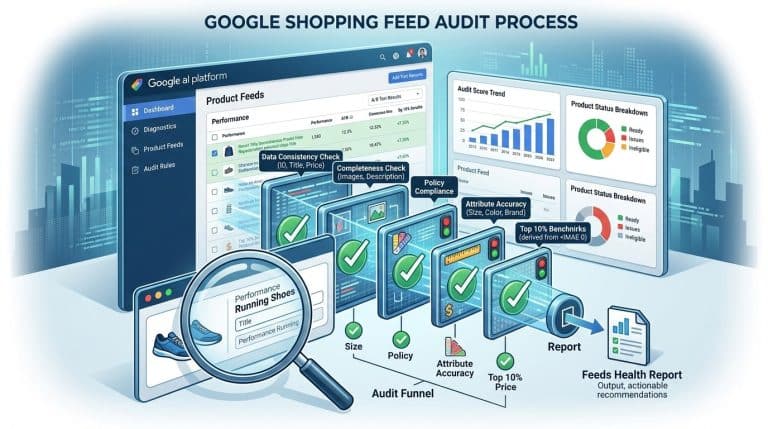
When I audit an account, I check coverage in this order:
- Title quality on top 50 revenue SKUs
- Image quality on top 50 revenue SKUs
- Availability accuracy across the full catalog (price/availability mismatch report)
- GTIN coverage where applicable
- Product type hierarchy (does it exist, is it useful)
- Item group ID coverage on variant products
- Color/size/material/pattern coverage in apparel and home
- Custom label coverage and whether they’re used in bidding
- Cost of goods sold if running Profit Optimization
Anything below that line gets a quick scan for disapprovals and warnings, then I leave it.
The traps I see
Spending three weeks on description rewrites. Descriptions matter at the margin. Title rewrites pay back faster.
Adding 60 attributes because the documentation lists them. Attribute completeness for its own sake isn’t a strategy. Each attribute should answer a query-matching, relevance, or bidding question.
Treating Google product category as a search field. It’s a filter, not a query match. Get it accurate, don’t overthink it.
Ignoring item group ID on a variant catalog. Apparel brands with 50 colors per shirt who skip item group ID lose Smart Bidding signal and split conversion data across SKUs that should share a learning curve.
Populating cost of goods sold but not using Profit Optimization. The field by itself does nothing. If you’re not running Profit Optimization, COGS is a useful signal for custom labels, but it’s not magic on its own.
Setting custom labels and then never using them in campaign structure. I open a lot of accounts where Custom Label 0 says “margin_high” or “margin_low” and the campaign treats those products identically. The labels only help if you bid against them.
When to skip attribute work entirely
If you’ve got fewer than 50 SKUs, attribute completeness probably isn’t your bottleneck. Spend the time on titles and Merchant Center hygiene instead.
If your category is purely branded and buyers search by exact model name, the manufacturer feed is usually close to complete. Audit it, fix the gaps, and move on.
If you’ve never set up custom labels OR you haven’t tied them to campaign structure, attribute work is premature. Custom labels first, then attribute coverage.
The short version
Tier 1 is non-negotiable. Tier 2 matters in your category if your category has visual or sized products. Tier 3 is where the bidding edge lives. Tier 4 and 5 are usually not where I’d spend a day.
For the audit framework that finds attribute gaps in the order I just described, see How to audit your Google Shopping feed. For the bigger picture, the data feed optimization guide puts attribute work in context. For the data stack behind any of this, review GA4 and BigQuery for Google Ads.